
What Do 1st, 2nd, and 3rd LinkedIn Connections Mean?
Key Takeaways
- Simple & Authentic Guidance on
- 1st Degree2nd degree
- and 3rd degree LinkedIn connections
- What does Out of Network or LinkedIn member mean on LinkedIn?
- LinkedIn limitations on 1st, 2nd and 3rd degree connections.
- Learn the rules of social networking on this professional site.
- How to manage quality over quantity in terms of networking.
LinkedIn allows its users to build and grow their professional network by sending tailored connection invitations to other members and by accepting the received invites from other platform users. Have you noticed “1st,” “2nd,” or “3rd” next to someone’s name on LinkedIn? Do you know what those numbers mean? If you are unaware of major LinkedIn connections and their types, you are one step behind in leveraging the platform features.
Along with these LinkedIn connection tags, you might be aware of What Are “Out of Network” or “LinkedIn Member status on different profiles. If not, don’t worry. We have gathered information about these numbers along with What Are “Out of Network” or “LinkedIn Member”. Take 10-15 minutes to learn how these contact degrees impact on your “Professional Networking”, “Personal Development”, and “Job Search”.
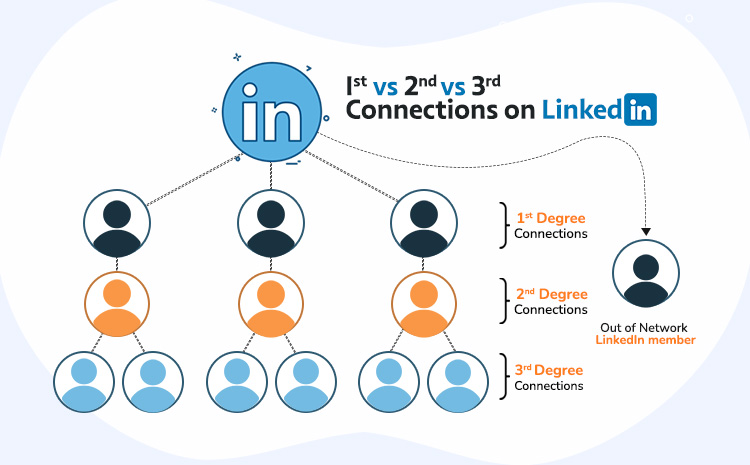
What are 1st, 2nd, and 3rd Degree LinkedIn Connections?
LinkedIn makes restrictions to your profile based on the connection level. So, understanding how to effectively use the 1st, 2nd, and 3rd degree networking levels and platform contact hierarchy to achieve your goals is key in 2025. Whether you are looking for jobs, providing services, or expanding businesses, 2025 and the future are all about adopting and leveraging emerging platforms.
1st Degree LinkedIn Connections
This platform assigns degrees based upon the connection level between two profiles. For better understanding you can consider your first, second, and third cousins. The first-degree contacts are directly connected with your professional profile. These people appear in your LinkedIn Network Tab. Don’t confuse yourself between a Network tab, including followers and following and Connections Tab.
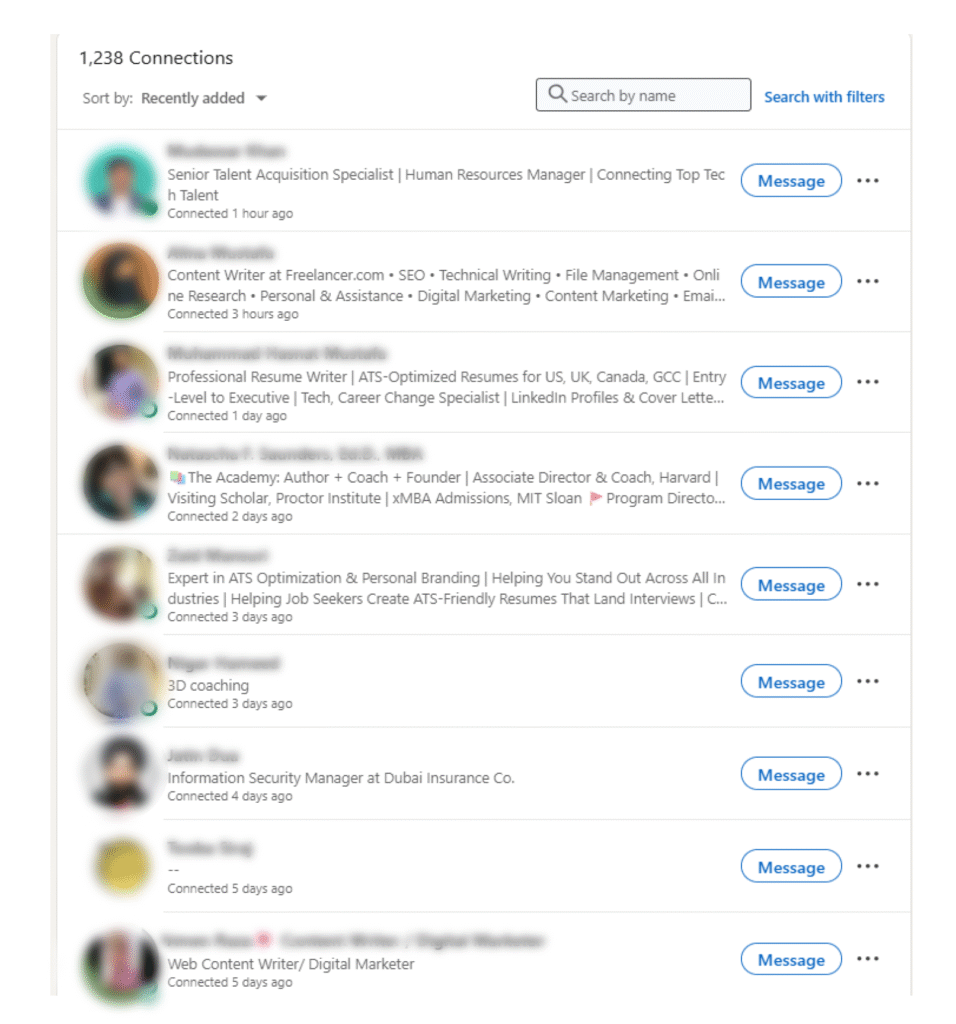
Curious about the difference between LinkedIn Connections and Network Tabs? ProResumes is here to clarify it for you.
All the profiles under “https://www.linkedin.com/mynetwork/invite-connect/connections/” will be your 1st degree contacts. Earlier this platform has Network size limit; you can make 30,000 1st-degree contacts. Once you have achieved this milestone your “Follow Button” will appear in place of “Connect”. But now it has upgraded platform settings and features. Now, you can make the “Follow Button” primary on your Profile even if you have 500 connections. Learn how to make the Follow Button primary.
4 key Impacts of 1st Degree LinkedIn Connections on Professional Networking
- Direct Access to People
- No InMail feature required to reach out and communicate.
- Prompt communication and interactions.
- Maximum Engagement & Increased Visibility
- More likes, comments, or content sharing.
- Trust & Social Proof
- Easier to build rapport with 2nd degree connections.
- Easier Referrals to 2nd- and 3rd-Degree
- They can introduce you to people in their LinkedIn network.
2nd degree connections on LinkedIn
2nd degree connections are people who are connected to your first-degree network, but not directly with you. They are also called Mutual Connections like mutual friends on Facebook. You are allowed to see their profiles and even send them connection requests. Want to turn a 2nd-degree into a 1st-degree LinkedIn connection?
- Review the profiles of 2nd degree connections.
- Develop a customized message to send (Connect with a note).
- Send a connection request when they are online (Green Dot).
3rd degree connections on LinkedIn
A 3rd degree is someone who is connected to your 2nd degree connections. You will find low visibility of their accounts. You can connect with 3rd degree directly or by requesting other people. No LinkedIn Premium account is required to turn 3rd degree to 1st.

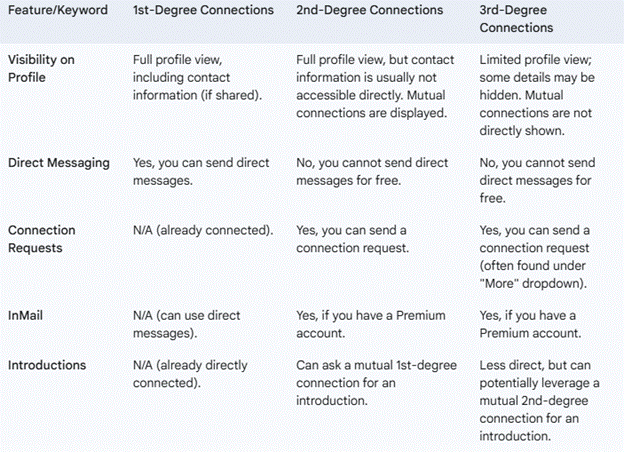
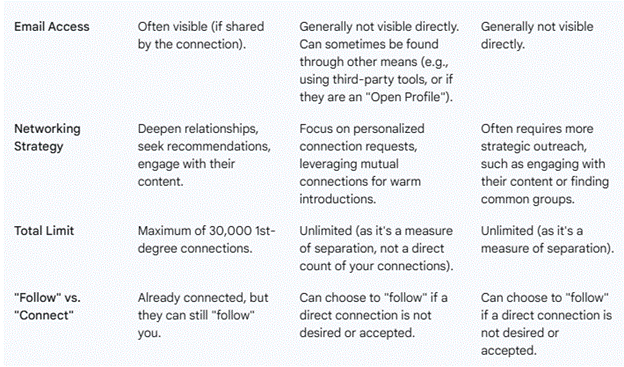
What are major LinkedIn Limitations on 1st, 2nd, and 3rd Connections?
It restricts functionality per connection level and subscription model. This professional networking platform maintains the privacy of its users for the ultimate experience with its services. Every user’s profile works according to set guidelines and available functions.
What is “Out of Network” or “LinkedIn Member?
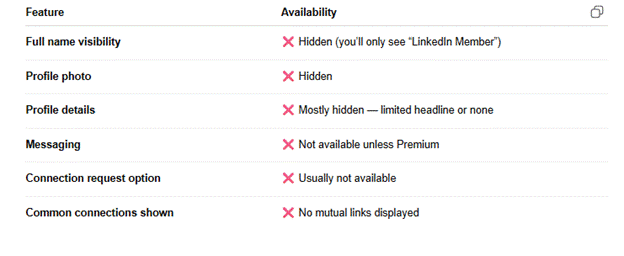
Out of Network means the profile is not in your 1st, 2nd, and 3rd degree network or you are blocked by someone. Additionally, this can happen to any degree of connection if the user has adjusted the profile setting.
How to Know Your Degree on LinkedIn
To identify someone’s connection level:
- Visit their profile.
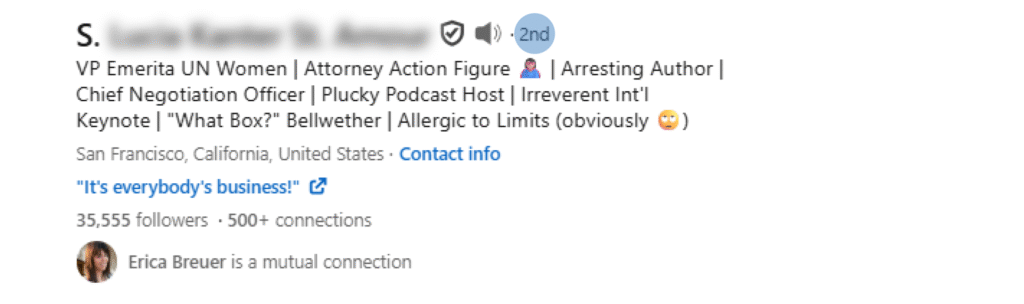
- Search for the “1st, “2nd,” or “3rd” sign to the right of their name.
- To see common contacts with other users as well as groups, use the “My Network” feature.
Benefits of Understanding LinkedIn Connection Types
| LinkedIn Connections Level | Benefits |
| 1st Degree | One-to-one communication, employee referrals, good rapport, product recommendations. |
| 2nd Degree | New connections, referred to common contacts, visibility in joined groups, more awareness about fields’ tendencies. |
| 3rd Degree | New industries, potential mentors, features for premium users, secret jobs. |
5 Social Networking Rules on LinkedIn
It is a professional networking platform that distinctly sets it apart from some of the social networks, including Facebook and Instagram.
Here’s what you should keep in mind:
- Keep It Professional
- Stay tuned to industry topics, advancements, and accomplishments.
- Do not post too many details of your personal life, or anything that you know other people will disagree with.
- Be Selective Yet Open
- Get in touch with other users, their interests should be similar to your career objectives but it is not prohibited to have common friends.
- Maintain a balance between quality and quantity of contact.
- Engage Authentically
- To maximize the company’s presence without the need for constant posts, it should like, comment and share other pages posts regularly.
- Engage with people by providing quality feedback to updates that connections share.
- Avoid Generic Messages
- Support creating meaningful impressions through customization of friend requests and of the messages exchanged.
- Add the field of connection or the interest to follow with the contact to enhance acceptances.
- Follow-Up Regularly
- Maintain relationships by periodically checking in or congratulating milestones.
6 Proven Strategies for Expanding Your LinkedIn Connections
1. Optimize Your Profile
- Professional picture and banner.
- An effective headline per the targeted roles.
- Emphasize skills and accomplishments.
2. Leverage Mutual Connections
- Directly request 1st degree to connect with 2nd degree contacts.
- Go through the “People You May Know” section to make contacts.
3. Join Industry Groups
- Discuss with the participants to connect with other like-minded candidates.
- Post information that is relevant; perhaps post an article where your business can be seen to be knowledgeable.
4. Send Personalized Invitations
- Include interest, a reference to contacts, or relevance within your industry in your requests.
- To increase the acceptance level, one should not use generic messages.
5. Balance Quality vs. Quantity
- Instead of accumulating as many contacts as possible, try to make as many strong ones as possible.
- Connect with fewer, but related and more effective networks for better interaction.
6. Use Premium Account
- Get more advanced search options and InMail messages for targeted networks.
- See who is interested in your profile.
- Learn how to pitch them.
FAQs
What’s the Difference Between LinkedIn Connection Tiers?
Connection tiers represent varying levels of proximity in your network:
- 1st Degree: Directly connected.
- 2nd Degree: Part of your 1st degree connections.
- 3rd Degree: Included in your 2nd degree connections network.
How Do I Expand Beyond 3rd Degree Connections?
- If you need more options for the search, try using a Premium Account.
- Useful groups and forums should be joined, where tempered activity can be provided.
- Use others to introduce you to those you do not know.
Why Can’t I Message Some Connections?
- It’s only possible to send messages to your Contact list, and only if you use a linked profile; it is only achievable if you also pay for a premium.
How Can I See Who Viewed My Profile?
- Only for the complete profile viewers’ analysis, a user should subscribe to Premium.
- Remind you to interact with your contacts so as to gain more visits to your profile.
How Do I Make My Profile Look Professional?
- Use clear, concise language.
- Thus, one should emphasize particular accomplishments and individual performance rates.
- Attach a certificate or a skill to the profile from time to time.
- Include a featured section with recent projects or articles.