
What Are LinkedIn Collaborative Articles? How to Master Them
Over 1 million professionals from diverse industries have engaged with LinkedIn Collaborative Articles since their launch in March 2023. This LinkedIn initiative is improving learning and engagement globally.
From resume writers to AI engineers, industry experts and learners are using these articles to build thought leadership, grow their networks, and earn the “Top Voice” badge. LinkedIn collaborative articles provide a valuable platform for early-career job seekers and seasoned professionals alike to share insights and build visibility without the need to be a content creator.
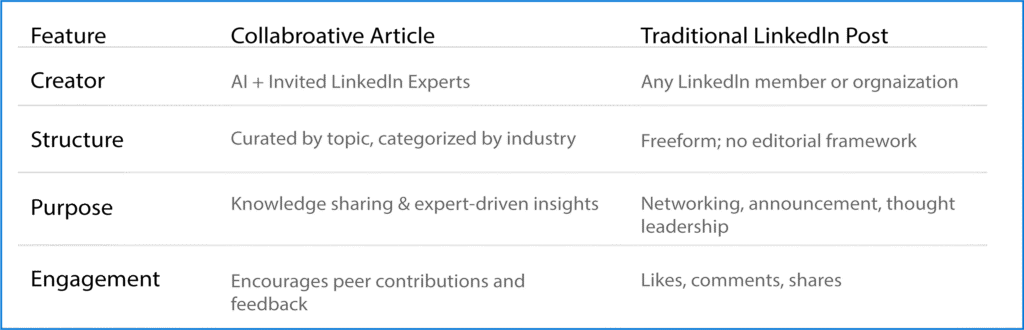
Collaborative Articles vs. Other LinkedIn Articles: What’s the Difference?
Collaborative articles are AI-powered conversation starters from LinkedIn with in-depth insights from their team members. LinkedIn experts divide the articles into different categories such as resume writing, IT, sales and marketing, and hospitality.
Other general articles or posts on LinkedIn are directly created by LinkedIn users or members, organizations, and LinkedIn Editors.
Collaborative Articles vs. Traditional LinkedIn Articles
Can you access the Collaborative Articles?
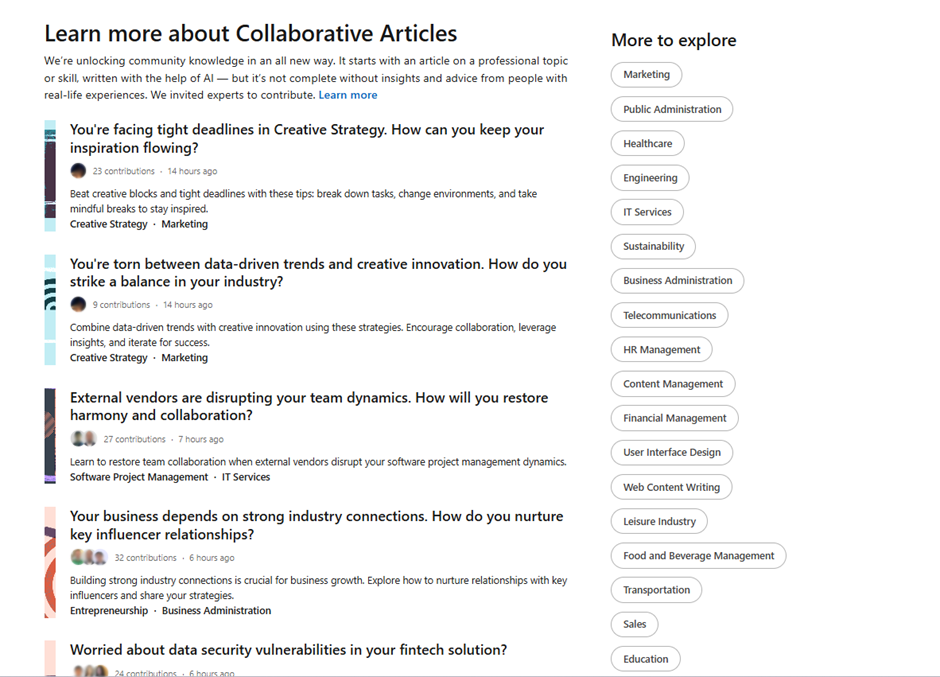
Yes, you can browse the list of collaborative articles. Click the categories on the right side of the page to explore collaborative articles aligned with your professional background and skills. You can view, engage, and repost the articles from your personal LinkedIn profile.
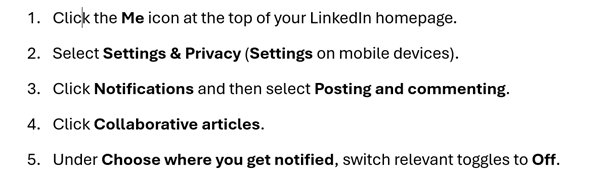
ProTip: Turn on the notification to receive updates for the selected category. LinkedIn article engagement can produce network building, job opportunities, or even collaborative article contributions for you as well. You don’t know how to turn on LinkedIn notifications for collaborative articles. ProResumes is here to support you.
To turn off notifications:
How can you contribute to LinkedIn Articles?
You can’t contribute directly to Community-sourced LinkedIn articles. LinkedIn experts identify, select, and invite expert members in specific topics based on their work experience, industry knowledge and achievements, professional skills proficiency, and prior engagement on the LinkedIn platform.
7 Ways and Professional Tips to Become a Contributor
- LinkedIn Profile Optimization & Management
- Post consistent, high-quality Industry-oriented Content
- Engage with Industry Experts & Professionals on LinkedIn
- Follow & Engage with LinkedIn Collaborative Articles
- Skills Endorsements & Recommendations from Industry Leaders
- Participate regularly in LinkedIn Community Groups
- Tag LinkedIn Experts & Use Rich Industry-Relevant Hashtags
Once you are selected for contributions within your industry. The LinkedIn team will send you an invitation to your registered email address. Additionally, you can add comments and delete your contribution to collaborative articles after the selection.
LinkedIn allows contributors and readers to report the articles as well as give their constructive feedback for further improvements.

Benefits of contributing to LinkedIn collaborative articles;
Every LinkedIn feature enhances visibility, builds authority, and supports long-term professional growth. Your productive contribution to these articles will grow your LinkedIn network along with your professional reputation. It will also maximize your global reach as collaborative articles are viewable by anyone worldwide, on or off LinkedIn.
Moreover, LinkedIn collaborative articles generate opportunities for peer-to-peer learning, thought leadership development, industrial improvements and innovations, and professional engagement on industry-specific topics.
As a collaborative article’s contributor, you have the best opportunity to:
- Earn a ‘Top Voice’ Badge
- Optimize LinkedIn Visibility
- Recognize as an expert in your field.
- Assist the LinkedIn community in professional development.
- Get more job opportunities
- Stay Updated on Industry Trends
- Increase LinkedIn connections
- Build a content portfolio
Conclusion
LinkedIn Collaborative Articles are transforming how beginners and professionals are learning from industry experts, sharing knowledge, building authority, and engaging with their industries. Collaborative articles are gaining momentum across different industries; they offer a powerful way to stay visible, stay relevant, and stay ahead in 2025 and beyond.
To increase your chances of being invited as a contributor and earning the Top Voice badge, you need to optimize your LinkedIn profile, engage with relevant content, and consistently showcase your professional expertise.