
UseResume ATS score checker and resume builder Review
UseResume ATS score checker is different from other tools because it offers section-wise resume analysis and feedback. Moreover, it also provides a 7-day pass that requires job seekers to pay for it once without worrying about auto-subscription.
Explore UseResume’s tools, features, pricing, and pros and cons to enhance the worth of your resume.
Explore ProResumes and find the career of your choice by exploring different career and salary guides.
How does the ATS score checker by UseResume work?
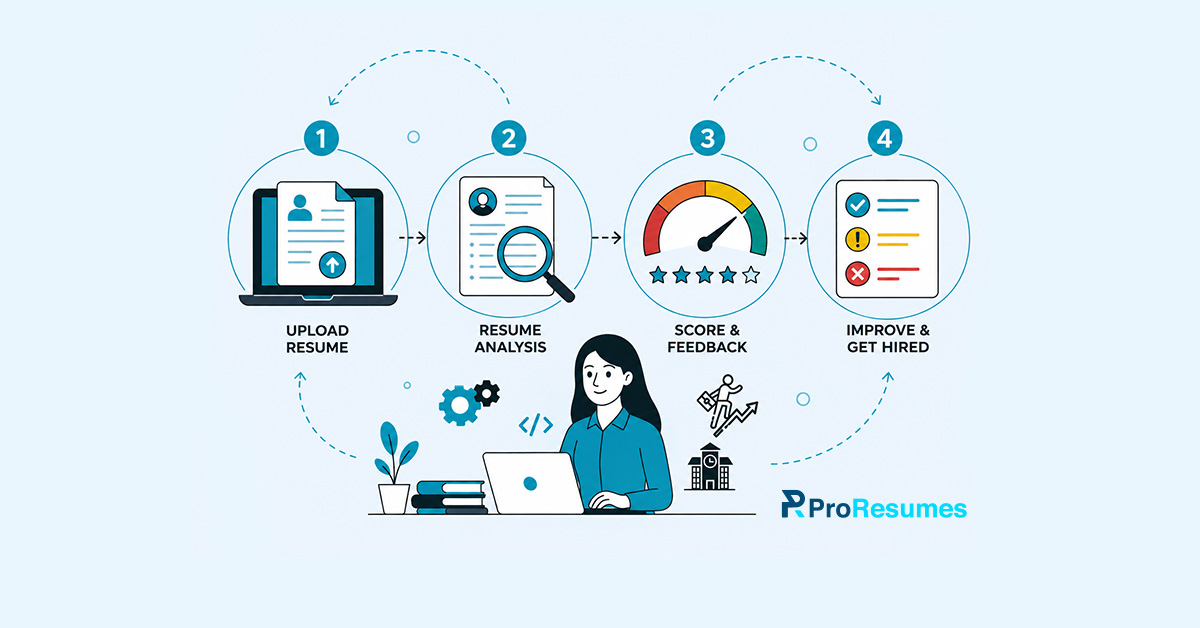
The resume score checker by UseResume works in the following way:
Document upload
The job seekers are required to upload a file in either a DOCX or a PDF format to start the resume analysis process. The applicants can also create a user account to receive a full resume analysis and to save their file for any later editing.
Resume analysis
Once the document file is uploaded to the platform, it takes a few seconds for resume analysis. The analysis consists of 37 main checks that ensure the following things:
- Readability
- Grammar
- Role clarity
- Contextual relevance
- Completeness
Score and feedback
Once the resume file is analyzed, the job seeker is directed to the page with the resume review report. The resume checking tool provides a score between 0 and 100 points with clear section-wise feedback.
This numerical score is usually provided after running the resume through some common tests for analysis. The ATS score, which is usually above 75 percent, indicates that a resume can easily clear an automated screening test.
Meanwhile, resumes with low ATS scores indicate that work is required in the highlighted areas. The resume review report also includes actionable insights for the applicants to fix their resumes, eventually increasing the ATS score.
How many areas are covered in the ATS score checked by UseResume?
We’ve discussed earlier that the resume score checker ensures that the uploaded document is analyzed for 37 main checks. These checks are mostly divided into eight main categories of resume areas that ensure proper clarity and conciseness.
The UseResume ATS score checker analyzes your resume according to the following criteria:
ATS readability
According to this criterion, the tool analyzes whether the resume document can easily pass the automated screening. It ensures that the document has clear and structured formatting along with visible resume section headings.
Moreover, it also ensures that the applicant didn’t provide any information in the header and footer sections. Since these sections appeared as images in ATS while the information written in them isn’t readable.
Quantified impact
The score checker also analyzes your resume for the use of quantified achievements and before-and-after story framing. The tool ensures that the bullets in the work history section include the achievements of an applicant along with their responsibilities.
Section completeness
The resume checker tool also analyzes the resume of the job seeker for completeness. It scans every resume section thoroughly to ensure that every detail is included.
The tool reviews the following things:
- Inclusion of active and professional contact details.
- Inclusion of at least two past work experiences.
- Inclusion of main educational details.
- Inclusion of both technical and soft skills.
Role clarity
According to this criterion, the UseResume ATS score checker analyzes the following aspects:
- Contextual relevance
- Use of consistent dates
- Clarity in job title
- Responsibility scope
- Seniority signals
Action language
The resume checker also scans the resume for the use of strong language that can effectively communicate a candidate’s worth. This check highlights areas of improvement like repeated wording, use of passive voice, and weak verbs. This ensures that the content of the resume is industry-specific and written in an active voice.
Repetition & Variety
The tool also analyzes the document for the overuse of some keywords, the inclusion of the same skills, and expertise. It also analyzes the document to filter out repeated career details, generic bullets, and more.
Formatting & Brevity
According to this criterion, the score checker makes sure that the resume can be scanned easily. It also checks the following points:
- The optimal length of the bullets.
- The visual density.
- The consistency in formatting and structure.
- The pages are used for a resume. (Resume length)
Spelling & Grammar
This check ensures that the entire content of the resume is free of any grammatical or spelling mistakes. Additionally, it also checks that there is consistent use of a tense.
How does the AI by UseResume help in creating a resume from scratch?
This resume platform allows users to create a resume from scratch or even edit it by utilizing the built-in resume builder. It also offers an AI assistant backed by Claude and Google AI to aid the following processes for resume development:
Crafts a solid summary
According to research, recruiters only take a few seconds, mostly less than ten, to glance at a resume. The professional summary is usually the first section that lists information regarding a professional’s career.
This section should be attention-grabbing and must compel the recruiter to read the document further. The AI assistant tool by this resume platform helps in developing a solid summary that focuses on the following points:
- Applicant’s main achievements
- Applicant’s years of expertise
- Applicant’s main skills
Optimizes your terminology
Many job applicants have the right expertise but lack the tactics of marketing themselves in a better way. The AI assistant tool of this platform helps in refining the terminology used throughout the resume or cover letter.
It provides suggestions for the applicants and also helps integrate better action verbs and industry-specific keywords. This eventually makes the document sound professional for both ATS and recruiter screening.
Integrates relevant keywords
Unlike many online resume score checkers, this platform refines your document with the keywords extracted from the job description. This automatically makes the document ATS-compliant and enhances the chances of getting a higher ATS ranking.
Moreover, in this way, the resume doesn’t sound robotic or artificial without overstuffing any keywords.
Identifies main skills
The AI assistant also analyzes the resume content and detects the main expertise and prominent skills of an applicant. It ensures to highlight these competencies in the professional summary, work history, and skills section.
Craft impactful bullet points
Simply writing about your past work responsibilities doesn’t impress employers. They want to know what you achieved instead of what you were responsible for. The resume bullet points generator helps the job seeker in creating impactful bullets.
The resume builder analyzes the shared content and professional details of an applicant to extract metrics and results. It also helps them in tailoring the bullets according to the target job requirements and quantifying them to achieve maximum impact.
What are the main advantages of using ATS resume checkers and a resume builder by UseResume?
The resume optimization tools by this platform can be used to avail the following types of benefits:
Job matching
The job seekers can simply paste the job description of the target role to tailor their job documents easily. The AI assistant tool helps in extracting impactful keywords and refining bullet points accordingly.
ATS friendliness
The resume checker utilizes 37 main checks to ensure that the document can pass the automated screening. Meanwhile, the resume builder helps in creating a document from scratch that follows all the ATS guidelines.
AI writing
UseResume offers effective AI resume writing services that save the time of an applicant and help them craft effective content. This includes refining the content, tailoring the content, and creating strong bullets and professional summaries.
Data protection
This platform ensures that the user’s data remains private. The platform clearly states that the resume data is never shared with or sold to third parties. Moreover, the data is also stored for a temporary period before being permanently removed from the server.
ATS-friendly designs
Unlike Canva, which offers pretty designs, this resume-building and optimization platform ensures that the document is ATS-compliant. It offers a range of designs and color combinations while ensuring that the resume text is readable for automated scanners.
Easy-to-use
Many user reviews on the website suggested that the interface of the platform is easy to use compared to other resume tools.
AI detection
Reviews shared that the AI detection features help job seekers ensure that their resumes are free of AI content. The detection helps in editing the document accordingly and allows the user to ensure that their document won’t be flagged by any AI detection tool.
7-day pass
The 7-day pass is a good feature by UseResume since it provides applicants with a one-time payment model. Reviews share that it doesn’t have a recurring payment setup. Moreover, it allows users to provide their credit card details without any worries.
What are the main drawbacks of using the resume optimization tools by UseResume?
Even though UseResume offers a range of advantages for its users, here’s a list of some drawbacks that job seekers should consider:
Lack of reviews
The website shared that the platform and its services are reviewed by more than 24,000 job seekers. However, it still lacks reviews on main review sites like Trustpilot. It displays a total of five reviews, including a one-star review on Trustpilot.
Subscription cancellation
A customer review shared that finding the subscription cancellation option is quite hard. Moreover, they also included that the platform has kept it hidden on purpose to keep getting recurring payments.
Wrong AI detection
Some past users also shared that the AI detection tool doesn’t work properly. A user shared that the AI detector flagged the content written by them as 85% AI content.
Expensive service
Some reviews also shared that the $20 monthly subscription is quite expensive compared to the services offered. Many shared that they can also get these services by using multiple free tools.
Wrong AI suggestions
The feedback for the AI assistant tool included that it provides wrong suggestions and often uses corporate buzzwords. A user shared that the AI tool provides edits that lack contextual relevance.
File download issues
Users also shared that UseResume messes up the entire file structure in the PDF download. It often overlaps the content and breaks the entire structure of the document.
Rigid structure
A user shared that the resume templates can’t be edited according to the user’s choice. Sure, there is little flexibility, but all other resume platforms provide it as well.
Unfriendly UI
The resume builder and editor tool isn’t very intuitive for users. According to a review, the platform should focus on the user-friendliness of the UI.
What are the features and pricing plans offered for job seekers by UseResume?
UseResume offers a range of the following features that are part of their monthly and 7-day service plans:
- Unlimited AI credits/document generations
- Unlimited downloads
- Unlimited versions
- All templates
- Multi-pass ATS optimization
- Cover letters
- AI detector
- Resignation letters
- Job tracker
- Priority support
Note: The 7-day pass plan offers 50 AI credits for users to optimize their resumes or generate documents.
Here are the pricing criteria and costs for both service plans offered by this online resume optimization platform:
| Pricing Package | Charges |
| Monthly Access | $9 for the first month, then $19/month |
| 7-day Pass | $12 7-day access, pay once |
Do you want resume writing services? Are you still looking for the best ATS resume checking online tool that delivers actual results? Explore the manual resume critique services along with an ATS scan for free by ProResumes.
Frequently Asked Questions
Q. What is a better resume optimization platform for job seekers among EnhanCV and UseResume?
According to UseResume, their AI assistant is powered by AI models like Claude, Google AI, OpenAI, and more. The integrated assistant in the resume builder ensures that the resume sections are edited accurately. Meanwhile, EnhanCV lacks an integrated AI assistant.
Moreover, UseResume allows job seekers to adjust their resumes while following the ATS guidelines. The templates are provided with various colors, combinations, and styles so that two resumes don’t appear similar. EnhanCV, on the other hand, provides a very limited number of templates that are rigid and can’t be edited easily.
Additionally, this resume platform offers all paid services in the monthly package for $20. Meanwhile, the monthly subscription of EnhanCV is around $24.99 with fewer credits. This makes UseResume a better option for job seekers.
Q. Is UseResume better than Canva?
The job seekers who want to find out which platform is better among the two should utilize Use Resume if:
- They are looking for a proper resume optimization platform instead of a resume service offered by another platform.
- They want a quality AI tool that is integrated into a resume builder and transforms their document according to contextual relevance.
- The applicants are failing the interview selection because all the online portals utilize ATS software.
- The job applicants are looking for flexible templates that are also visually compliant with ATS.
Moreover, while Canva offers beautiful resume templates for job seekers, it doesn’t provide ATS-friendliness. Rigid ATS like Workday are unable to read from Canva templates because they are image files. This makes them entirely useless.
Meanwhile, this resume platform ensures that the resume is clean, structured, and compliant for automated screening. Moreover, it also offers a built-in AI assistant that lets job seekers edit their resumes during the creation.
Q. Should job seekers utilize online resume builders instead of ChatGPT?
Yes, job seekers are recommended by career experts to use free online resume builder tools. The reason behind this is that ChatGPT is an AI model that is capable of writing. It can’t provide keyword analysis or an ATS score that can help job seekers alter their documents for automated screening.
Meanwhile, online resume builder tools are specifically designed to utilize AI for resume building and analysis. These tools don’t just help job seekers create a resume from scratch, but also provide the following:
- ATS-friendly templates
- Job tracker
- Cover letter generator
- ATS score checker
- AI detector
Q. What is the AI credits feature in UseResume?
The AI credits are tokens that are provided to use an AI-related service offered by the platform, such as:
- Tailor the resume document according to the target job description.
- Quantifying achievements in resumes to enhance the impact.
- Creating a personalized cover letter according to the content of an applicant’s resume.