
Jobalytics ATS Resume checker and Tools Review 2026
Jobalytics is a platform that is created by a job seeker to organize and streamline their job search process. It provides a range of tools like an ATS resume checker, a job tracker, a resume summary, and a cover letter generator.
Want to know if it’s good for you? Explore Jobalytics features, tools, pricing, pros, and cons.
Explore ProResumes blogs to find a career you want to pursue!
How to use the ATS score checker by Jobalytics?
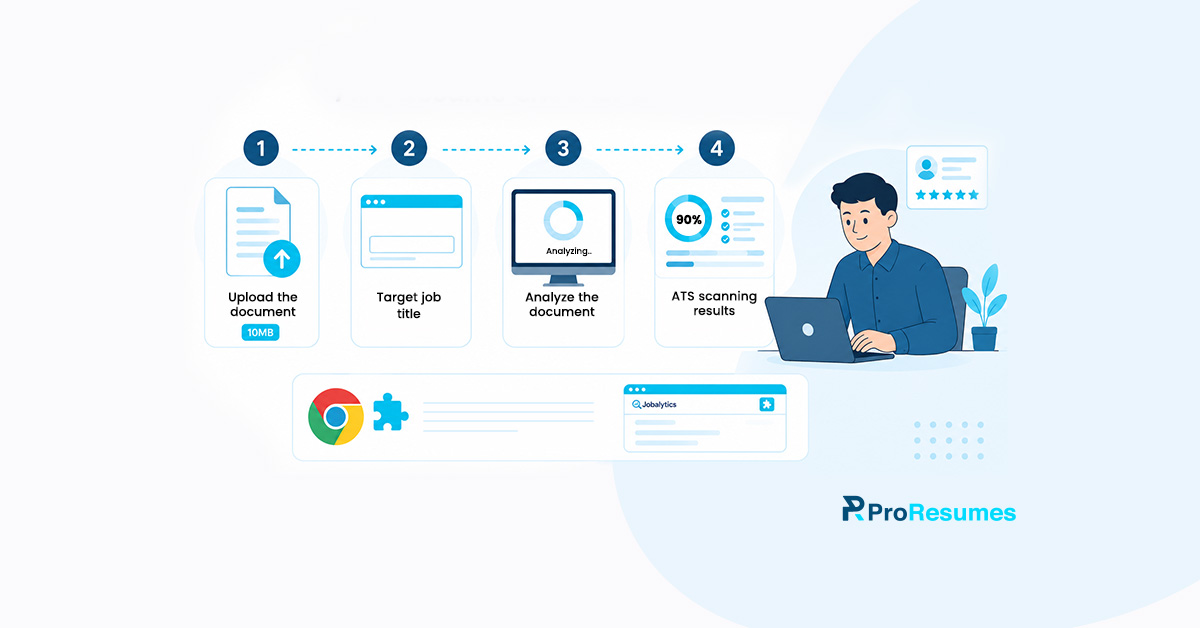
The ATS score checker by this platform is one of the famous free online tools that helps with resume analysis. If you’re a job seeker who wants quick results, follow these steps to get your document analyzed:
Upload the document
The first step is to upload your resume through the upload option on the website. Moreover, the platform allows job seekers to use a resume file that is either in PDF or DOCX format. The suggested file size shouldn’t exceed 10MB.
Moreover, job seekers can also simply paste their resume text if they don’t have a compatible file format.
Include target job details
Once you’re done uploading or pasting your resume content, include your target job details. The ATS resume checker requires one to include details like the target job title and job description text.
This step allows the analysis to be in alignment with the requirements of the recruiter. Moreover, it also helps in tailoring your resume better in accordance with the employer’s expectations.
Analyze the document
After including all resumes and target job details, the job seeker is required to click on the “Analyze” button. The ATS resume checker took a few seconds to scan the document. After that, it provides you with a list of matched and missing keywords.
The analysis of the resume by this score checker ensures the probability of matched keywords between the resume and the job description. The resume with more keywords from the job description ranks higher than the one with fewer keywords.
Get ATS scanning results
The resume review report shares a numerical score within 100 points and actionable insights on how to optimize your resume. According to the platform, the best ATS score is generally 70% or more to achieve a good ATS ranking.
Meanwhile, the resume applications that score lower than 50% have critical ATS issues and get filtered by automated systems.
How to use the Chrome extension by Jobalytics?
The Chrome extension helps in saving job postings from different job boards and analyzing resumes according to job descriptions. Follow these steps if you want to use this Chrome extension:
Go to the Chrome Store
You can simply find the link to the Chrome extension on the official website. However, users can also search the Chrome Web Store by simply searching for “Jobalytics”.
Get the extension
Once you’ve found the extension, add it to your browser by installing it or clicking on the ” Add to Chrome ” button. You can verify the installation by checking for this extension icon in the Chrome toolbar.
Start saving jobs
Once you have the extension installed, you can use it by exploring jobs on any job site. The extension can easily work with the following sites:
- Glassdoor
- Indeed
- ZipRecruiter
- Monster
- CareerBuilder
- Greenhouse
- Company sites
Job seekers can easily find jobs from these sites, save them, and utilize job descriptions for instant resume analysis. The best part about this extension is that it lets an applicant stay updated and easily track applications.
What are the Jobalytics tools that support a candidate’s job search process?
Apart from the ATS score checker and Chrome extension, Jobalytics also provides a range of other tools, like:
Job tracker
The platform helps job seekers in streamlining their job search process by offering a tool that provides the following benefits:
- Visual kanban board: The users can easily organize all their job applications in a single place and keep themselves updated on the status. The tool also offers drag-and-drop options for users to keep their job search progress up to date.
- Application cards: These cards help job seekers include all crucial job-related details in a single place. Applicants can add stuff like salary, job title, job post URL, resume submission deadline, and more. To make things more sorted, users can include tags or highlight important ones.
- Multiple views: The platform also offers two different settings, like the kanban board and table view. The board allows the applicant to track their progress visually, while the tables allow them to add precise details.
- Easy search filters: The platform makes it easy for users to find their applications by using search filters like companies, job positions, and more.
- Customized status column: The applicants can also include customized columns like phone screens, background checks, and more. These columns can easily be edited and renamed for better clarity and personalization.
Cover letter generator
The cover letter generator is integrated with AI that offers the following benefits for the applicants:
- AI writing: The AI technology is used to analyze the resume content for creating personalized cover letters that create impact.
- Job-specific targeting: The tool also analyzes the job description in depth to ensure that your cover letter meets the employer’s expectations.
- Length variations: The tool also offers three options, such as short, medium, and long, for different types of cover letter requirements.
- Tones and Styles: The tool also offers a variety of writing tones and styles that suit different industries. The users can go for a professional tone for corporate jobs and a casual one for the creative industry.
- Easy Download: The tool allows the applicant to easily copy the cover letter’s text to their clipboard. Moreover, they can also download it in PDF format for submission.
Resume summary generator
The summary generator tool also utilizes AI to provide the following benefits for job seekers:
- Resume integration: The users can utilize their uploaded resume file and save job descriptions to create a summary accordingly.
- Tone and length variation: The job seekers can easily customize their summaries with writing tones like professional, casual, and more. They can also adjust the length with short, long, and medium options.
- Job-specific tailoring: The tool helps the applicant tailor the summary according to the requirements mentioned in the job description.
How effective are the ATS score checker and other resume tools by Jobalytics?
The resume development and optimization tools by Jobalytics offer the following benefits:
Free ATS scanning
The tool allows job seekers to scan their resumes unlimitedly for basic analysis. The best thing is that it doesn’t require any credit card details or account creation.
Keyword optimization
The resume analysis helps a user analyze the lack of keywords in their resume that can add more impact.
Accurate ATS Score
According to the platform’s claims, it provides the most accurate ATS score after analyzing resumes. Jobalytics shared that they utilize advanced technologies, and their algorithms are highly trained.
Quick results
The resume checker provides the entire resume review report and ATS score within seconds. This makes it easier for the applicants to speed up their resume optimization process.
Local storage
The work of the user is saved in their browser, which allows them to get back to work from where they left.
Unlimited checks
Unlike many free resume ATS scanners online, this platform and tool allow the user to scan multiple documents. This eventually helps in streamlining the job search process.
Data protection
The platform makes sure that the data of the applicant is secured and stored on their local browser. Since Jobalytics values privacy, they don’t save the applicant’s data on its server.
What are the drawbacks of using resume tools and services by Jobalytics?
Here’s a list of issues that customers faced after using the services of this resume platform:
Glitchy extension
According to some resumes, Linux users can’t upload their resumes using the Chrome extension. This often frustrates most users.
Missing or Wrong keywords
Some reviews shared that the tools often provide very wrong keyword suggestions from job descriptions. These suggestions are usually random and often don’t relate to the target job requirements either.
Paid advance features
Even though the platform provides basic ATS scanning for free, users can’t utilize their tools for detailed analysis. Moreover, the entire resume analysis that includes feedback on formatting and content is among the paid features.
Inconsistent ATS score
A review shared that the ATS resume checker provides inconsistent scores for similar files. Moreover, it often recommends the addition of keywords that are already a part of the document.
What are the main features and charges of the service plans offered by Jobalytics?
The pricing plans offered by Jobalytics include all the free features along with the following advanced ones:
- Unlimited job tracking
- Advanced ATS keyword analysis
- Full AI Resume Score analysis
- Unlimited AI cover letters
- Unlimited AI resume summaries
- Unlimited AI interview prep
- Chrome Extension AI features
- Priority email support
Moreover, here’s a list of the current charges for all the pricing plans that include advanced features to streamline job search:
| Pricing Package | Charges |
| Weekly | $9/ Week |
| Quarterly | $49/ 3 Months |
| Monthly | $19/ Month |
Want to get a better and more authentic resume analysis than the automated one? Visit ProResumes and get a free manual resume critique and an ATS scan to find the actual issues.
Frequently Asked Questions
Q. Is the ATS score checker for Jobalytics free?
Yes, the ATS resume checker is 100% free for users who just want basic resume analysis. These job seekers aren’t required to create a new account or provide their credit card details.
The users of this platform need not worry about any hidden fees. They can simply analyze their documents to find alignment with as many job descriptions as they want.
Q. How to improve your ATS score with Jobalytics?
If you wish to improve your ATS score with the feedback and resume analysis feedback provided by Jobalytics, follow these:
- Use exact keywords: The tool and Chrome extension extract and provide the list of keywords used in the job description. The job seekers are required to use these keywords in the same way they are utilized in the target job description.
For example, if an abbreviation of a word is used in the job description, make sure to include it along with the full form. Since the ATS software scans the applications according to the list of keywords included in the job descriptions.
Moreover, use the keywords the same way they are written in the job description instead of changing them or using synonyms.
- Include the same job title: It is important to use a similar job title in your resume to ensure a better ATS ranking. For example, if the word “Cybersecurity analyst” is written in a job description, use it in your resume.
Instead of just mentioning the past work positions you held in the cybersecurity industry.
- Use simple formatting: Many ATS software like Workday can’t parse documents that include fancy fonts, tables, images or infographics. The algorithm responsible for parsing applications can’t read resumes with complicated formatting.
- Include specific skills: If the job description mentions a specific list of software and technologies, include them in your resume. One can add them to the technical skills section or to the summary and work experience for better keyword optimization.
- Analyze and tailor your documents: It is important to tailor your documents according to the target job description whenever you apply for a job. The job seekers are advised to tailor their documents and analyze each one before submitting them.
Q. Does the extension by Jobalytics slow down the browser of the job seeker?
No, the Chrome extension is designed as a lightweight tool that can aid job seekers during their job search. Moreover, it can only be activated by the applicant at the time of use, so it doesn’t affect the browsing experience.
Q. Which is better between Jobalytics and Jobscan?
Jobscan is a very famous resume platform that helps job seekers with their ATS resume checker. It provides detailed keyword analysis and resume review reports that highlight many ATS issues.
However, the platform only provides 5 free ATS scans in a month while covering some basic features with a paywall. Job seekers who are interested in utilizing it for a full-fledged job search can purchase a monthly subscription for $49.95.
Meanwhile, Jobalytics offers free basic ATS scanning for its users without the need for any sign-up or account creation. It’s best for job seekers who want an easy-to-use platform with unlimited and instant ATS scanning with job description alignment.
Moreover, the monthly subscription of this resume platform is around $19 if one wishes to use advanced features.